

LLMs
Developer Tools
Claude Opus 5.5 vs GPT-6: Why Sol Is the Real Rival.
Claude Opus 5.5 scores 58 on the Artificial Analysis index against GPT-6 Astra's 53 and Sol's 48. But Sol costs half as much and runs faster. Full breakdown.
•11 min read
Experience the power of Google’s Gemini CLI - a free, open-source AI assistant that lives in your terminal. Generate, debug, and automate code effortlessly.
🚀 Google's Gemini CLI: A New Era of AI-Powered Development Straight From Your Terminal
AI isn’t coming to your terminal—it’s already here. With Gemini CLI, Google is redefining how developers build, debug, and ship software. This open-source tool brings the power of Gemini AI directly into your local workflows, bridging the gap between natural language and code faster than ever before.
Whether you’re a solo developer, a startup founder, or part of a massive engineering team, Gemini CLI is poised to transform how you work.
Gemini CLI is a command-line interface that lets you interact with Google’s advanced Gemini AI models using natural language. Imagine an AI-powered coding partner that lives right inside your terminal—ready to generate code, troubleshoot issues, or research anything you need, all without breaking your flow.
Built on the powerful Gemini 2.5 Pro model, Gemini CLI can handle everything from generating boilerplate code to analyzing complex errors.
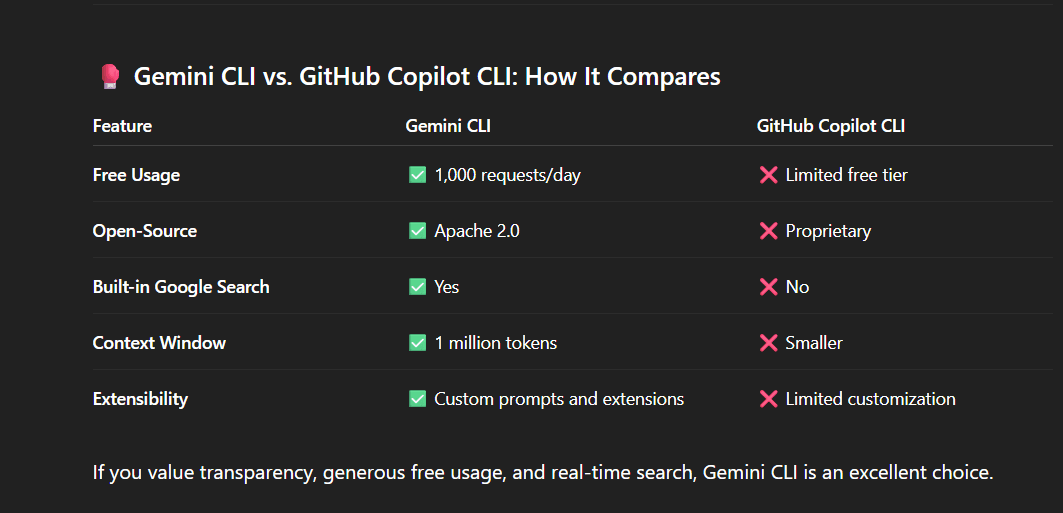
✅ Open-Source and Free Gemini CLI is licensed under Apache 2.0, so you can inspect, extend, and adapt it. Plus, most developers will never hit the free tier limits:
60 requests per minute
Up to 1,000 requests per day
✅ Seamless Terminal Integration Stop switching between tabs and tools. Gemini CLI lives in your terminal, streamlining your workflow into a single, focused environment.
✅ Massive Context Window With a 1-million-token context window, Gemini CLI can understand and process huge codebases without losing track.
✅ Extensibility and Custom Prompts Bundle your own extensions, configure prompts for your workflow, and integrate with tools like Gemini Code Assist.
✅ Built-in Google Search No more copy-pasting error messages into your browser—Gemini CLI fetches up-to-date information straight from Google Search.
Ready to see it in action?
Prerequisites: Install Node.js (v18+).
Then run:
npm install -g @google/gemini-cli
To launch the interactive CLI:
gemini
On your first run, you’ll pick a theme and sign in with your Google account. That’s it—your AI coding assistant is ready.
Gemini CLI is more than a code generator—it’s a versatile assistant that can:
✅ Generate and Explain Code Prompt: “Write a TypeScript function to validate email addresses.” Output: Clean, production-ready code with inline comments.
✅ Debug and Fix Errors Prompt: “I’m getting TypeError: undefined is not a function. What’s wrong?” Output: Detailed analysis and a suggested fix.
✅ Work with Local Files Use @ to reference project files so Gemini can read, modify, and refactor your code intelligently.
✅ Automate Repetitive Tasks Script routine chores like formatting, dependency updates, or file generation.
✅ Research Without Leaving the Terminal Fetch documentation and tutorials with integrated Google Search.
If you value transparency, generous free usage, and real-time search, Gemini CLI is an excellent choice.
Gemini CLI is a first step toward a world where software development is conversational. In the coming months, expect even tighter integration with:
Gemini Code Assist
Google Cloud tooling
Personalized, context-aware AI agents that anticipate your next move
This is more than a new way to code—it’s a preview of how human-machine collaboration will shape the next decade.
Don’t wait to see the future—start building it.
Install Gemini CLI today and experience AI-powered development from your terminal.
➡️ Official Gemini CLI Blog - https://blog.google/technology/developers/introducing-gemini-cli-open-source-ai-agent/
➡️ Explore the official Gemini CLI docs - https://cloud.google.com/gemini/docs/codeassist/gemini-cli
We can explore how Gemini CLI helps your team code faster and smarter.
Continue exploring these related topics
Claude Opus 5.5 scores 58 on the Artificial Analysis index against GPT-6 Astra's 53 and Sol's 48. But Sol costs half as much and runs faster. Full breakdown.
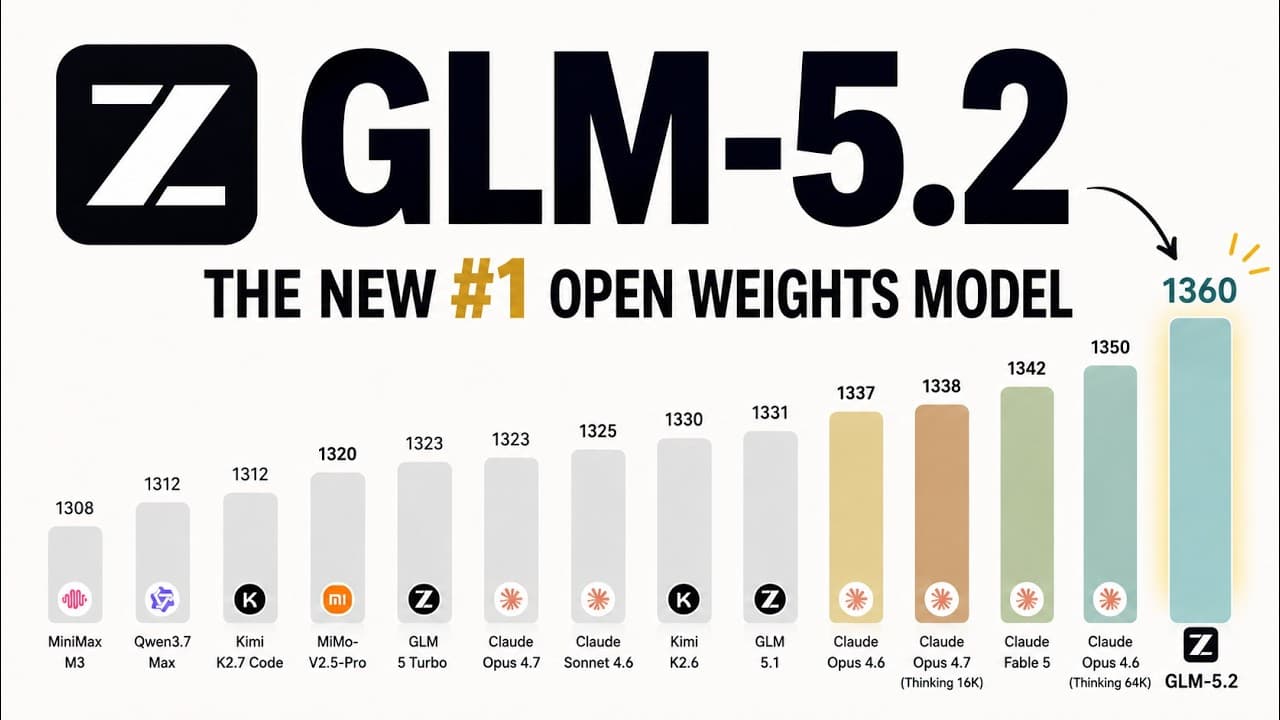
GLM-5.2 is Z.ai's new flagship text model for long-horizon engineering work: 1M-token context, 128K maximum output, function calling, structured output, MCP integration, and a public model card on Hugging Face.
Two flagship AI models. Five weeks apart. Same price — but very different strengths. Here's the honest breakdown of Claude Opus 4.8 vs GPT-5.5 on benchmarks, pricing, and real-world performance.