Imagine you’re studying for an exam.
Would you take every book in the library to the exam hall? That’d be hilarious — and exhausting. 😅
Instead, what if you could bring only the relevant notes when needed, and grab more if that topic pops up? That’s basically what Dynamic Context Discovery does for AI coding assistants in Cursor.
Let’s dive in! 👇
What Is Dynamic Context Discovery?
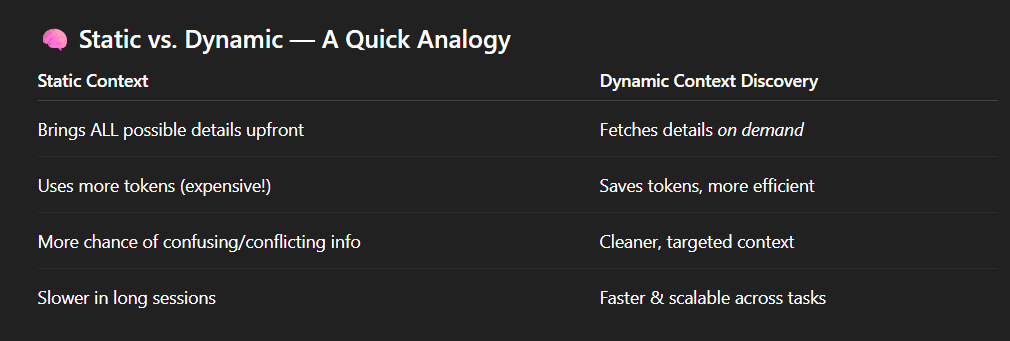
In the world of AI, “context” is everything the model knows before answering a question — like the recent conversation, your codebase, tool outputs, and more. Traditionally, AI systems use static context, meaning everything relevant is loaded upfront even if it’s not needed right away.
Dynamic Context Discovery, on the other hand, changes this:
➤ Instead of stuffing every possible detail into the AI’s memory from the start, the system only pulls in what’s needed when it’s actually needed.
That means smarter, faster, and cheaper AI interactions — without the mental (and token) clutter. 🧹
Why Cursor Needed This 💡
Cursor’s AI agents help developers by reading code files, summarizing changes, referencing past edits, interacting with tools, and even understanding history logs. But here’s the problem:
📌 Big tool outputs or long histories can really clutter the AI’s context window (the fixed amount of “attention” space the AI has).
📌 With static context, everything could get dumped at once — creating noise and token wastage.
So Cursor introduced dynamic context mechanisms — letting the AI fetch and load relevant pieces only when needed.
How Dynamic Context Discovery Actually Works in Cursor
1. Turn Big Tool Results Into Files 🗃️
Large outputs — like long JSON prints from tools — are written to files instead of being dumped into context logs.
The AI can then read portions on demand, using commands like tail to check endings or read more if needed.
➡️ This avoids bloating the context window with every detail at once.
2. Reference Chat History Efficiently 📜
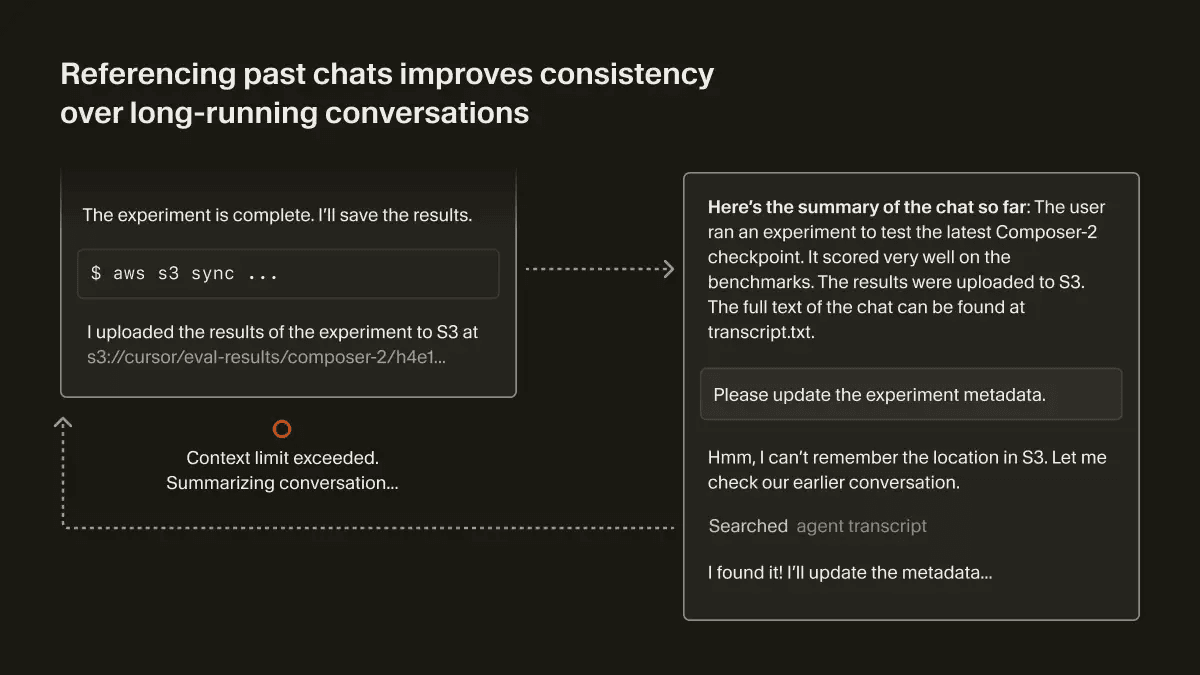
When your conversation gets too long, AI sessions often summarize things to free up space. But summaries can lose details.
Cursor keeps a history file of the chat so that if the AI needs a detail later, it can look it up instead of re-storing everything.
➡️ This boosts accuracy while keeping context lean.
3. Load Only Needed Tools and Skills 🧠
Many tools (especially behind enterprise systems) have long descriptions and lots of commands.
Instead of loading all tools into every prompt, Cursor pulls only the ones needed for the current task.
➡️ This cuts unnecessary token usage.
4. Treat Terminal Sessions as Files 📂
Output from your terminal (like logs or build output) can also be HUGE.
Cursor saves these outputs to the filesystem, letting the agent read only chunks when necessary — just like reading a book one chapter at a time.
➡️ Saves memory and keeps things snappy.
Real Impact: Faster and More Efficient AI Coding
Developers in the Cursor community noticed that dynamic context significantly reduces total token usage — in some cases by ~46.9% compared to older static context approaches.
Fewer tokens means:
- 💸 Lower costs (especially in pay-per-token systems).
- ⚡ Faster responses because the AI processes less clutter.
- 🧠 Higher clarity since the AI sees only what matters.
And Yes — It Still Keeps Quality High
One Reddit user pointed out that while dynamic context focuses on efficiency, it doesn’t degrade the quality of AI answers, as fewer but more relevant details often improve clarity.
It’s like removing background noise at a concert — you hear the band better, not worse. 🎸
Why This Matters for Developers
Whether you’re a solo coder or part of a team:
✅ You spend less time fighting AI confusion and more time shipping features.
✅ Your coding assistant stays focused on what’s relevant, not everything ever.
✅ Token-based systems cost less when unused data doesn’t sit idle in context.
Basically, dynamic context discovery helps AI talk less nonsense and more sense. 😄
Summary — TL;DR
Dynamic Context Discovery in Cursor means:
- 🧠 Smarter context loading — only when needed.
- 📉 Big drops in token usage (up to ~47%).
- 🗃️ Using files instead of huge inline dumps.
- 📂 Efficient tool and chat history access.
- 💡 Better speed and cleaner AI outputs.