

Working on this in your product? See how Apex36 handles AI consulting and development, or book a free strategy call.
Is RAG dead? Not quite, but the default way of building it is no longer the automatic choice. RAG (retrieval-augmented generation) means finding the relevant passages in your documents and giving them to a language model to answer from. In 2026 three things changed: context windows reached a million tokens, AI providers started offering hosted file search, and new research showed agents that search documents directly can beat the classic setup on some files. This post explains what changed and how to choose a design for your own document assistant.
The short answer
- Small, stable set of documents: put them in the prompt and use prompt caching.
- Large, changing or permissioned data: you still need retrieval.
- Long, table-heavy documents like financial reports and contracts: give the model search tools, including plain keyword search, instead of only "top 5 chunks".
- Always: cite sources, test on real questions, and start with the simplest design that passes.
What changed in 2026
Context windows got very large
Anthropic's documentation lists a 1 million token context window for its current Claude models. That's enough for thousands of pages. But the same documentation warns: "more context isn't automatically better. As token count grows, accuracy and recall degrade, a phenomenon known as context rot." An older study, "Lost in the Middle" (Liu et al.), found models answered worse when the relevant fact sat in the middle of a long input.
Hosted file search became a product
You can now upload files and let the AI provider handle the retrieval:
- Google's Gemini File Search manages storage, chunking and embeddings for you. Storage and query-time embeddings are free; retrieved text is charged as normal input. Each document can be up to 100 MB.
- OpenAI's file search tool searches uploaded files with both meaning-based and keyword search. It costs $0.10 per GB per day of storage after the first free GB, plus $2.50 per 1,000 searches.
- Anthropic offers a Files API for uploading documents once, and citations that return the exact passages behind each claim.
Agentic search beat chunk-and-embed on one hard document
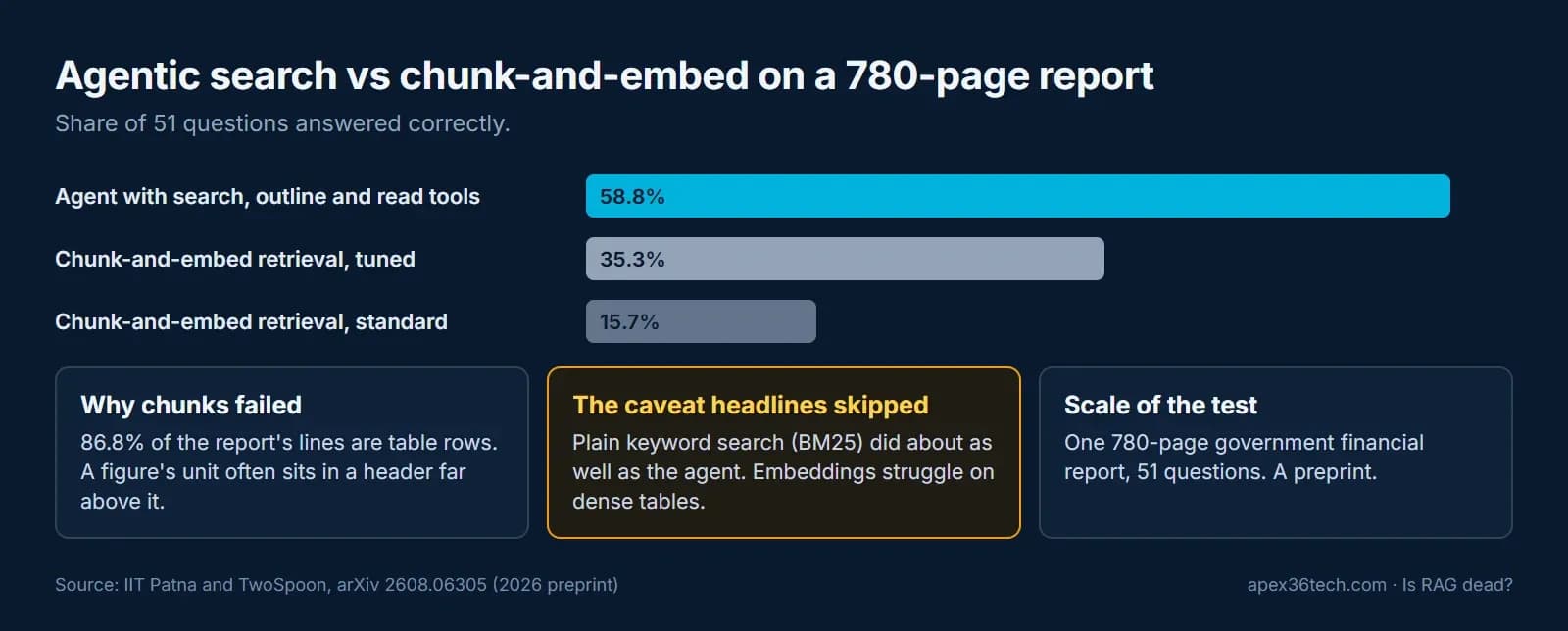
A 2026 preprint from IIT Patna and TwoSpoon (arXiv 2608.06305) tested a 780-page government financial report with 51 questions. An agent that could search the text, read the outline and read exact line ranges answered 58.8% correctly. Standard chunk-and-embed retrieval got 15.7% (35.3% after tuning). The reason: 86.8% of the report's lines are table rows, and a figure's unit often sits in a header far above it, so small chunks lose their meaning.
The same paper adds a caveat the headlines skipped: plain keyword search (BM25) did about as well as the agent. The lesson is that embeddings struggle on dense tables, not that agents beat everything. And it's one document with 51 questions.
When to put everything in the prompt
If your documents are small and rarely change, skip retrieval. Anthropic suggested in 2024 (as Qdrant also quotes) that a knowledge base under about 200,000 tokens, roughly 500 pages, can go straight into the prompt. With prompt caching, repeated questions over the same documents cost far less.
Cost still matters at scale. Qdrant, a vector database company, worked an example at an assumed $2 per million input tokens: sending 200,000 tokens with every question costs about $0.40 per question, against about $0.01 for a 5,000-token retrieval result, or about $0.02 with caching. Check current prices for your model before you plan on these numbers.
When retrieval still wins
Qdrant puts it well: "RAG is not dead, and long context is not a gimmick." Retrieval is still the practical choice when:
- The data doesn't fit in the context window, or would cost too much to send every time.
- The data changes often, so you'd keep rebuilding a giant prompt.
- Different users may see different data, so each answer must only use documents that person is allowed to read.
- You need to show sources for every answer.
Many good systems use both: retrieval to find the right documents, then a large context to read them whole.
Choosing a design
| Your situation | Start with |
|---|---|
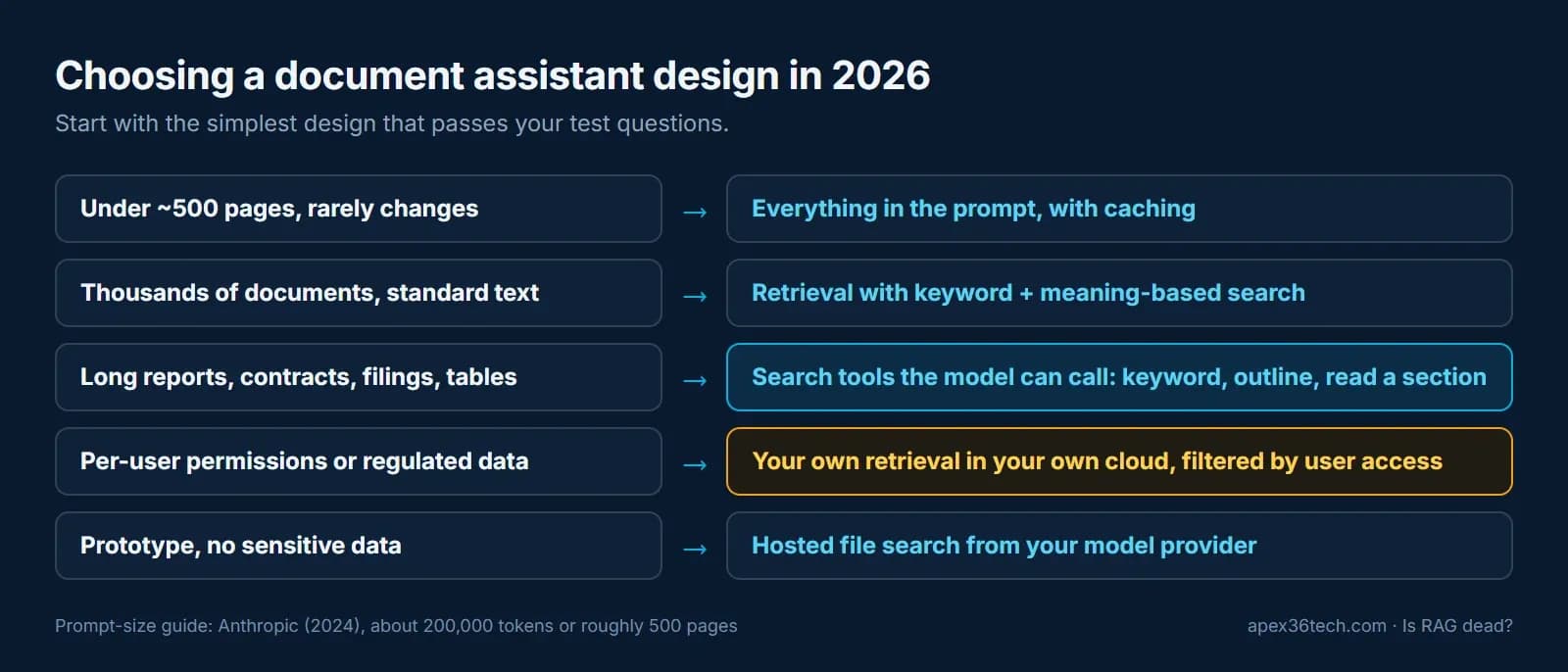
| Under about 500 pages, rarely changes | Everything in the prompt, with caching |
| Thousands of documents, standard text | Retrieval with both keyword and meaning-based search |
| Long reports, contracts, filings, tables | Search tools the model can call: keyword search, outline, read a section |
| Per-user permissions or regulated data | Your own retrieval in your own cloud, filtered by user access |
| Prototype, no sensitive data | Hosted file search from your model provider |
Hosted file search or build your own?
Hosted file search is the fastest way to a working prototype. You upload files and get answers with citations in days. The trade-offs: limits on file and store size, less control over how documents are split and searched, and your documents live with the provider.
Your own retrieval takes longer but gives you per-user permissions, hybrid keyword and meaning-based search tuned to your documents, and the option to run everything inside your own cloud account. For regulated or confidential data, that's usually the deciding factor. See our private LLM deployment page for how that works.
How we'd build a document assistant today
- Write the test first. Collect 30 to 50 real questions with known right answers from the people who'll use it.
- Try the simplest design. If the documents fit, start with everything in the prompt.
- Measure, then add. Add retrieval, keyword search or agentic search only where the test shows it's needed.
- Cite every answer and let the assistant say "I don't know".
- Keep the test running after launch, because new documents and model updates change results.
We've built document assistants for legal teams, including DecoverAI, which answers questions from large sets of case documents, and a legal assistant that answers only from UAE laws and documents. Our AI chatbot development page covers how we build them.
Frequently Asked Questions
Planning a document assistant?
We'll help you pick the simplest design that answers your questions well.