

Working on this in your product? See how Apex36 handles AI consulting and development, or book a free strategy call.
AI for law firms: use cases, costs and build vs buy
By Yash Soni, Founder & CEO, Apex36 · Updated November 2026
AI for law firms pays off first on reading-heavy work: first-pass document review, searching large matters by meaning, research and drafting help, intake summaries and sorting the shared inbox. Ready-made legal AI tools cost from a few hundred dollars per lawyer per month, and a custom build makes sense only when your workflow, data or confidentiality rules do not fit a product. Either way, an attorney stays in charge of the decisions that carry legal risk. Whether you are choosing AI for lawyers across a whole firm or for your own practice, this guide covers where AI helps first, what it costs, how to choose between buying and building, and the rules to check before any client file goes in.
How many law firms use AI?
It depends on who is asked and what counts as "using AI", so read these figures side by side, not as one trend line:
- ABA, 2024 survey (512 US attorneys on the research volume): 30.2% said their offices were using AI-based tools, rising to 47.8% at firms with 500 or more lawyers. The ABA reports this as up from 11% in 2023. Accuracy was the top concern, named by 74.7%.
- Clio, 2025 Legal Trends Report (1,702 US legal professionals, lawyers and staff): 79% said they use AI in their firms, and nearly half use a general tool such as ChatGPT, Gemini, Claude or Perplexity rather than a legal-specific one.
The gap between the two is mostly method: Clio counts any use by any staff member, including free general tools, while the ABA asked about the office's tools. Both point the same way. Many lawyers already use AI, often through general chat tools the firm never chose, which is why a firm-level decision on tools and rules matters.
Where AI helps a law firm first
| Use case | What the AI does | Who checks it | Usually buy or build? |
|---|---|---|---|
| First-pass document review | Marks each document for responsiveness and likely privilege, with a confidence score | An attorney reviews low-confidence and privileged documents and approves redactions | Buy for standard review; build when review categories or volumes are your own |
| eDiscovery search | Finds documents by meaning, not exact words, and answers questions with cited passages | The reviewer checks each cited passage | Buy, or build when matters are very large or data must stay in your account |
| Legal research | Finds and summarises authorities | A lawyer reads each authority before it goes in a filing | Buy |
| Drafting help | Produces a first draft of a letter, clause or summary | A lawyer edits and signs off | Buy |
| Contract review | Flags clauses against a playbook and suggests redlines | A lawyer accepts or rejects each change | Buy, unless your playbook or document flow is unusual |
| Matter intake | Turns an intake form or email into a summary with parties, dates and conflicts to check | Intake staff and the conflicts check | Often build, because intake is firm-specific |
| Shared inbox triage | Sorts intake@, billing@ and court notices by type and urgency, and alerts the right person | Staff correct misfiled items in one click | Buy a triage product or build for your own categories |
| Q&A on the firm's own sources | Answers only from precedents, client contracts or one jurisdiction's laws, with the source shown | The lawyer who asked | Build, or a product that lets you limit sources |
Document review: first pass with attorney override
Document review is where most firms see the clearest return. The pattern that works:
- A classifier marks each document for responsiveness and likely privilege, with a confidence score
- High-confidence, non-privileged documents get a proposed decision
- Low-confidence and privileged documents go to an attorney queue instead of being decided automatically
- Redactions are proposed by the system and approved by an attorney
- Each decision, by the model or by a person, is written to an audit trail
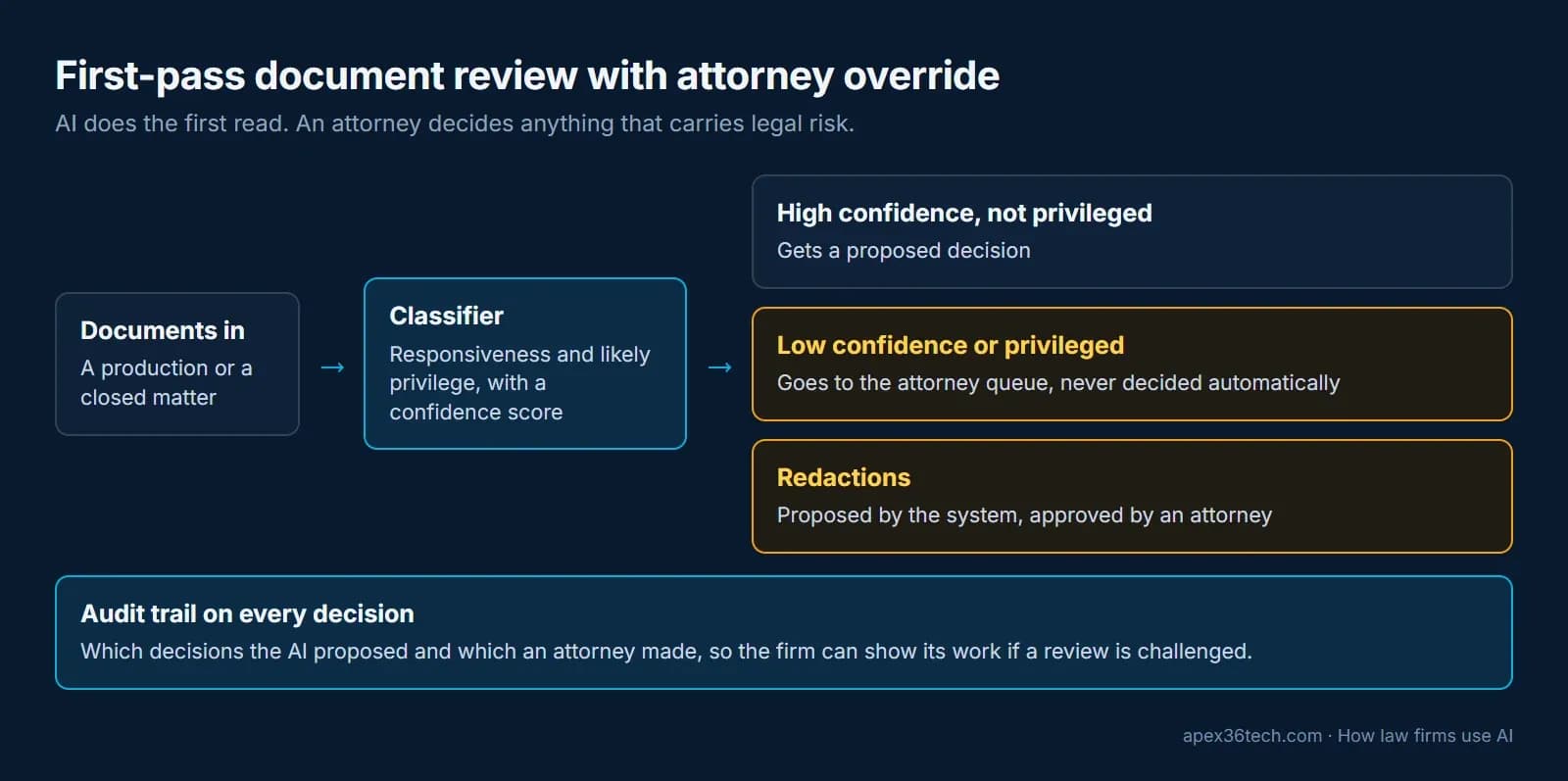 The audit trail matters as much as the model. If a review is challenged, the firm can show which decisions the AI proposed and which an attorney made. We helped build DecoverAI's legal AI platform, which works this way, with attorney override on each AI decision.
eDiscovery at scale: search by meaning
Keyword search misses documents that say the same thing in different words. Semantic search, backed by a vector database, finds documents by meaning. Retrieval-augmented generation (RAG) goes a step further: it answers a question from the matter's own documents and cites the passages it used, so a reviewer can check the answer. Large productions also need sturdy ingestion: documents processed in queues, in the background, so a delivery of hundreds of thousands of files does not break the system or lose anything.
Legal Q&A assistants: answers from your own sources
A legal assistant answers questions from a fixed set of documents: the firm's precedents, a client's contracts, or the laws of one jurisdiction. The good ones answer only from those sources, show the passage behind each answer, and say when they don't know. We built one that answers only from UAE laws and documents, so it never mixes in rules from other countries. Keeping the source set narrow is what makes it trustworthy. See how we build AI chatbots like this.
Intake and the shared inbox
Shared inboxes collect court notices, new matter requests, invoices and client questions in one stream. Sorting them by hand is slow, and a missed deadline is expensive. AI triage classifies each email by type and urgency, files it and alerts the right person when something cannot wait. TriageGrid, our own product, does this for law firms on Microsoft 365: it classifies Outlook mail into categories such as intake, court deadlines and billing, then tags, moves, forwards or flags it.
What legal AI tools cost
Most legal AI vendors do not publish a full price list, and prices change often, so check the vendor's own pricing page before you budget. The Harvey wording below is quoted from its FAQ as read on 27 November 2026.
| Tool | What it does | Price | Where to check |
|---|---|---|---|
| Harvey | Research, drafting, contract analysis, due diligence | "On average, Harvey costs several hundred dollars per user per month"; licensed per seat; quote from sales | Harvey FAQ |
| CoCounsel (Thomson Reuters) | Research plus AI document analysis and drafting | See the vendor's pricing page | Thomson Reuters plans and pricing |
| Clio Manage | Practice management, with AI features on some plans | See the vendor's pricing page | Clio pricing |
| Clio Work | Legal AI workspace for research, analysis and drafting | See the vendor's pricing page | Clio Work pricing |
| Spellbook | Contract drafting and review in Word | See the vendor's pricing page | Spellbook pricing |
How much does Harvey AI cost?
Harvey does not publish a rate card. Its own FAQ says: "On average, Harvey costs several hundred dollars per user per month. Pricing depends on the number of seats, which products you deploy, and contract terms." Harvey is licensed per seat, and for the exact figure it asks you to contact sales for a quote. Ask LexisNexis, a knowledge-source add-on inside Harvey, is licensed separately. Higher per-seat figures and minimum seat counts circulate on review sites, but they cite no Harvey document, so treat them as reports and ask for a written quote.
What this means for a budget: seat-priced legal AI scales with headcount. If a tool costs several hundred dollars a seat each month, ten lawyers cost several thousand dollars a month, month after month, whether or not each lawyer uses it. Ask each vendor about minimum seat counts, contract length and which features need an add-on.
What a custom legal AI build costs
A custom build is a one-off project plus running costs, not a per-seat fee. Across the market, most AI projects reviewed on Clutch cost $10,000 to $49,999, and the median entry price for a production AI agent in the Gigabit index of 30 firms is $20,000 (both from our AI development cost guide).
At Apex36, a first automated workflow, such as inbox triage for one shared mailbox, starts from $5,000, and legal AI projects such as document review support start from $8,000. Large document volumes, a private model inside your own cloud account and integrations with your document management system move the price up. Model and cloud costs are billed to your own accounts, and you get a fixed quote in writing after discovery. See pricing.
After launch, budget for model fees, which depend on volume and the model you choose, plus hosting and someone to maintain the system.
Buy, build or both
A seat licence and a custom build usually do different jobs, so the choice is rarely one or the other for the whole firm.
- Buy when the task is standard (research, drafting help, standard contract review) and the product's data terms fit your rules. Most firms should start here.
- Build when the workflow is yours: your own review categories, an intake flow tied to your practice areas, filing into your document management system, or documents that must never leave your own servers.
- Both when a product does most of the job but needs a custom connection to your systems, or when you buy a research tool and build intake or triage around how your firm works.
Three questions settle most cases:
- Does a product already do this task the way your firm does it? If yes, buy.
- Can client documents go to the vendor's cloud under your policy and your clients' terms? If no, build inside your own account or look for a vendor that deploys there.
- Will you pay for many seats to use one narrow feature? If yes, price a build of that one workflow against a year of seats.
The risk to plan for: made-up citations
General AI tools can produce authorities that do not exist. In Mata v. Avianca (S.D.N.Y., 2023), the court fined two lawyers and their firm $5,000 after a filing cited cases that ChatGPT had invented. It is not a one-off: a public database kept by researcher Damien Charlotin lists 2,338 court decisions involving hallucinated content as of 25 November 2026, 932 of them involving lawyers.
The fix is process, not a better prompt: each authority is read by a lawyer before it goes in a filing, research tools are chosen for cited sources, and the firm's AI policy says so in writing.
Ethics and confidentiality rules to check
United States. ABA Formal Opinion 512 (July 2024) applies lawyers' existing duties to generative AI: competence, confidentiality, communication with clients, supervision and reasonable fees. On fees, lawyers who bill hourly must bill the time they actually spent, and generally may not charge clients for time spent learning a tool. Check your state bar's guidance too.
United Kingdom. The Law Society's "Generative AI: the essentials" guidance gives solicitors a checklist: define the purpose, follow the SRA Code of Conduct, review the vendor's data management and security, establish whether the tool is a closed system within the firm's boundaries or trains on your data, tell clients how AI is used, and check outputs for accuracy.
Before any client document goes into an AI tool, ask the vendor:
- Where are documents stored, and in which region?
- Are our documents used to train models or shared with other customers?
- Can the model run inside our own cloud account if our policy requires it?
- Who can access each matter, and is each access logged?
- Can we see each AI decision and each human override after the fact?
If the answers are vague, the tool is not ready for client files. Where documents cannot go to an outside model API at all, a model can run inside the firm's own account (see private LLM hosting).
How to start: one workflow, measured
- Pick one reading-heavy workflow, such as triage for one shared mailbox or first-pass review on a closed matter.
- Measure today's process: time per document or email, error rate, missed items.
- Run the AI version on the same work, with lawyers reviewing its output.
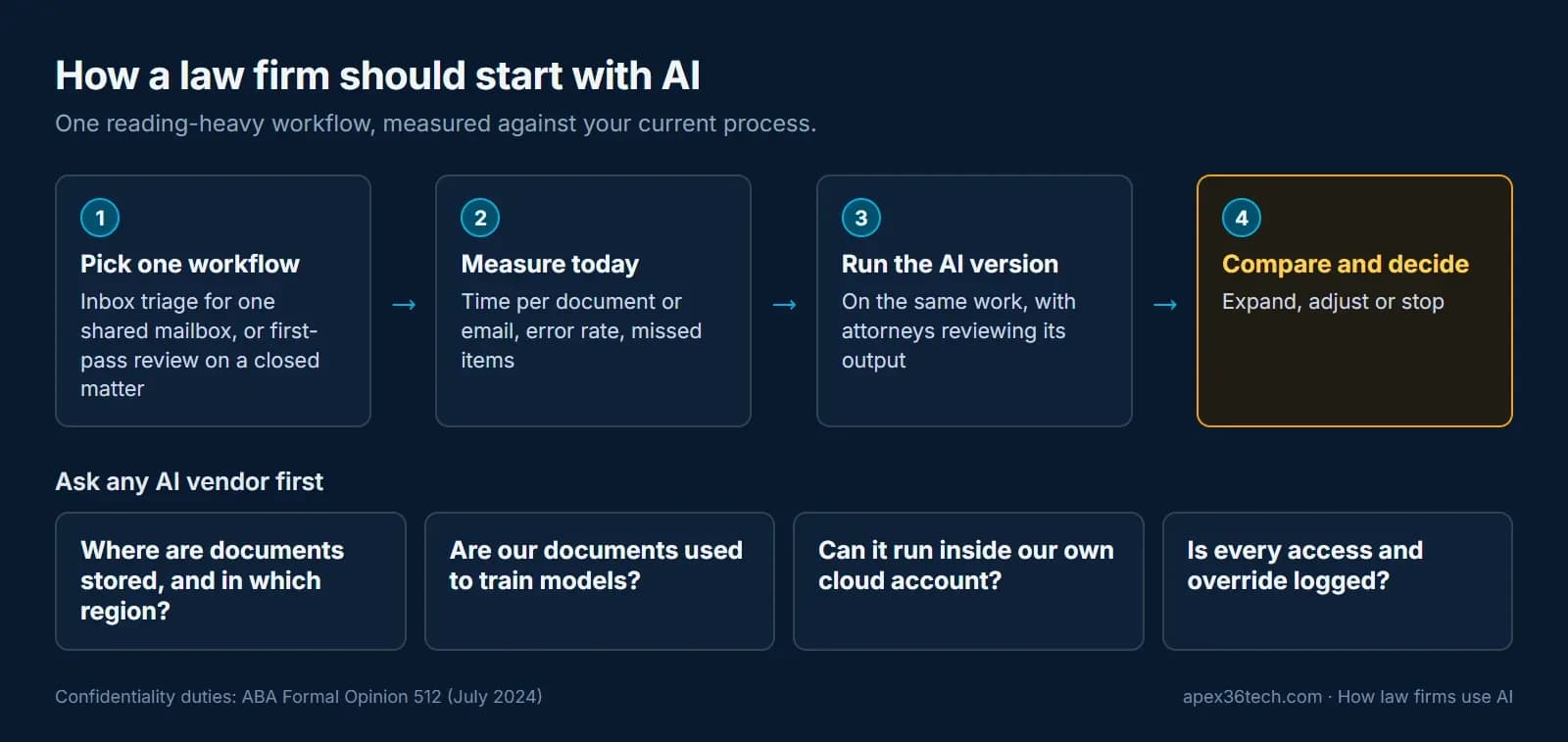 4. Compare, then expand, adjust or stop.
For how we build legal AI for firms and legal tech companies, see legal AI development.
Frequently Asked Questions
References
- American Bar Association, 2024 Artificial Intelligence TechReport (April 2025): https://www.americanbar.org/groups/law_practice/resources/tech-report/2024/2024-artificial-intelligence-techreport/
- American Bar Association, 2024 Cloud Computing TechReport (11% in 2023): https://www.americanbar.org/groups/law_practice/resources/tech-report/2024/2024-cloud-computing-techreport/
- Clio, 2025 Legal Trends Report: https://www.clio.com/wp-content/uploads/2025/09/2025-Legal-Trends-Report.pdf
- Harvey FAQ, pricing: https://help.harvey.ai/articles/harvey-faq
- Thomson Reuters, CoCounsel plans and pricing: https://sales.legalsolutions.thomsonreuters.com/en-us/products/cocounsel-legal/300/plans-pricing
- Clio pricing: https://www.clio.com/pricing/ and Clio Work pricing: https://www.clio.com/work/pricing/
- Spellbook pricing: https://spellbook.com/pricing
- Mata v. Avianca, Opinion and Order on Sanctions (S.D.N.Y., June 2023), via ABA Litigation News: https://www.americanbar.org/groups/litigation/resources/litigation-news/2023/use-chatgpt-research-bogus-cases-sanctions/
- Damien Charlotin, AI Hallucination Cases database: https://www.damiencharlotin.com/hallucinations/
- ABA Formal Opinion 512 (July 2024): https://www.americanbar.org/content/dam/aba/administrative/professional_responsibility/ethics-opinions/aba-formal-opinion-512.pdf
- The Law Society, Generative AI: the essentials: https://www.lawsociety.org.uk/topics/ai-and-lawtech/generative-ai-the-essentials
Next step: take the free AI readiness assessment, or see how we build legal AI. Related: private LLM hosting and AI development.
Thinking about AI for your firm?
We look at one workflow with you and say whether to buy, build or wait.